· 14 min read
Making walls sound like walls
An Unreal audio plugin that muffles sound by what each wall is made of and how thick it is.
Stock Unreal Engine 6 muffles a sound when one line trace hits anything, so a chair leg can smother a radio. My Acoustic Occlusion plugin casts 13 rays per sound, prices every wall they cross by its material and thickness in three frequency bands, and bends sound through open doorways.
- Engine
- Unreal Engine 6, C++
- Platforms
- PC VR and standalone Quest 3
Stock occlusion
FActiveSound::CheckOcclusion runs one test trace from the sound to the listener on the attenuation’s occlusion channel, ignores the sound’s owner, and gets back a bool. If anything blocks the line, the sound glides to a low-pass cutoff and a volume scale set on the attenuation. Out of the box those are 20 kHz and 1.0, so nothing happens until you tune them. I had mine at 1 kHz and 0.2x volume.
That’s binary, so a broom handle counts as much as a concrete wall, and it never learns what it hit or how thick it was. The filter is a single pole, 6 dB per octave, so every wall gets the same curve.
I measured both halves of the clip above against the dry loop, in one octave round each band’s centre (177 Hz, 705 Hz and 2.8 kHz).
| Loss in the clip, low / mid / high | Stock | Acoustic Occlusion |
|---|---|---|
| Curtain | 14.1 / 15.7 / 23.6 dB | 0.6 / 1.4 / 2.9 dB |
| Concrete | 13.9 / 15.6 / 23.6 dB | 18.6 / 22.7 / 26.8 dB |
| Stud wall | 14.0 / 15.7 / 23.6 dB | 8.3 / 20.1 / 22.7 dB |
Stock takes as much off a curtain as off 15 cm of concrete. The plugin lands within half a decibel of each face’s placard, apart from the stud wall’s mid band. Across that octave the band filters still overlap a little, so some of the low band’s much smaller loss leaks in and costs about 3 dB.
I replaced that check through two plugin slots the engine already has. The occlusion slot (IAudioOcclusion) gets each voice’s buffer on the audio render thread, after distance attenuation and before the spatializer, and runs my EQ. The source data override slot (IAudioSourceDataOverride) runs on the audio thread and can move where the spatializer hears a sound from, which is how doorways work. With my settings on an attenuation, the engine skips its own trace. The VR game I’m building also runs on standalone Quest 3, so nothing may block the audio render thread.
Why a wall sounds like a wall
Sound gets through a wall by shaking it. A heavy wall barely moves, and any wall moves less at high frequencies. That’s the mass law: for a single solid panel, transmission loss climbs about 6 dB per doubling of mass or frequency. It has the shape of a first-order low-pass, so for one thin panel a gain plus the engine’s one-pole filter is the right model.
A stud wall is two sheets with air between them. The air acts as a spring, the sheets resonate together around 100 to 125 Hz, and above that the loss climbs about 18 dB per octave. The stud wall the National Research Council of Canada measured loses 16 dB in the low band and 46 in the mid, so the thump passes and the voice doesn’t. Glass goes the other way. Above about 2.1 kHz the bending waves in a 6 mm pane line up with the sound in the air and the loss stops climbing, so its high band (29 dB) sits under its mid band (32 dB). And gaps win. A 30 dB door with a 13 mm undercut comes out at 21.4 dB, because more sound goes under the door than through it.
Compare the shape of each purple line with the grey one, which is stock occlusion at my old settings.
One curve can’t draw a shelf, a dip and a slope, so the plugin has three bands.
Three bands
Lab transmission data comes in octave bands, so I split where the data splits: 125 and 250 Hz are the low band, 500 Hz and 1 kHz the mid, 2 and 4 kHz the high, with crossovers at 355 Hz and 1.4 kHz. I settled the count by fitting one gain plus a low-pass to the same data. The hollow door fits, concrete is 3.5 dB off, glass comes out 15 dB too dark in the high band, and the stud wall doesn’t fit at all. Steam Audio splits at 800 Hz and 8 kHz, which puts almost all the difference between building materials into one band.
Per voice, the engine’s Linkwitz-Riley band splitter (4-pole, phase compensated) splits the buffer, each band gets its own gain ramped across it, and the bands sum back together. A voice that has never been occluded skips the filters and passes through bit-exact. The first time it’s occluded mid-sound, it crossfades from dry over one buffer and stays engaged until it ends. Gains move in dB, faster when a sound gets louder (60 ms) than quieter (150 ms), so an opening door opens the sound almost at once.
const float TimeConstant = TargetLossDb < StartLossDb[Band]
	? Voice.AttackSeconds : Voice.ReleaseSeconds;
const float Alpha = TimeConstant > 0.0f
	? 1.0f - FMath::Exp(-BufferSeconds / TimeConstant) : 1.0f;
EndLossDb[Band] = StartLossDb[Band] + (TargetLossDb - StartLossDb[Band]) * Alpha;
...
const float Wet = Low[Sample] * GainLow + Mid[Sample] * GainMid
	+ High[Sample] * GainHigh;
Out[Sample] = bCrossfadeFromDry ? FMath::Lerp(In[Sample], Wet, Ramp) : Wet;
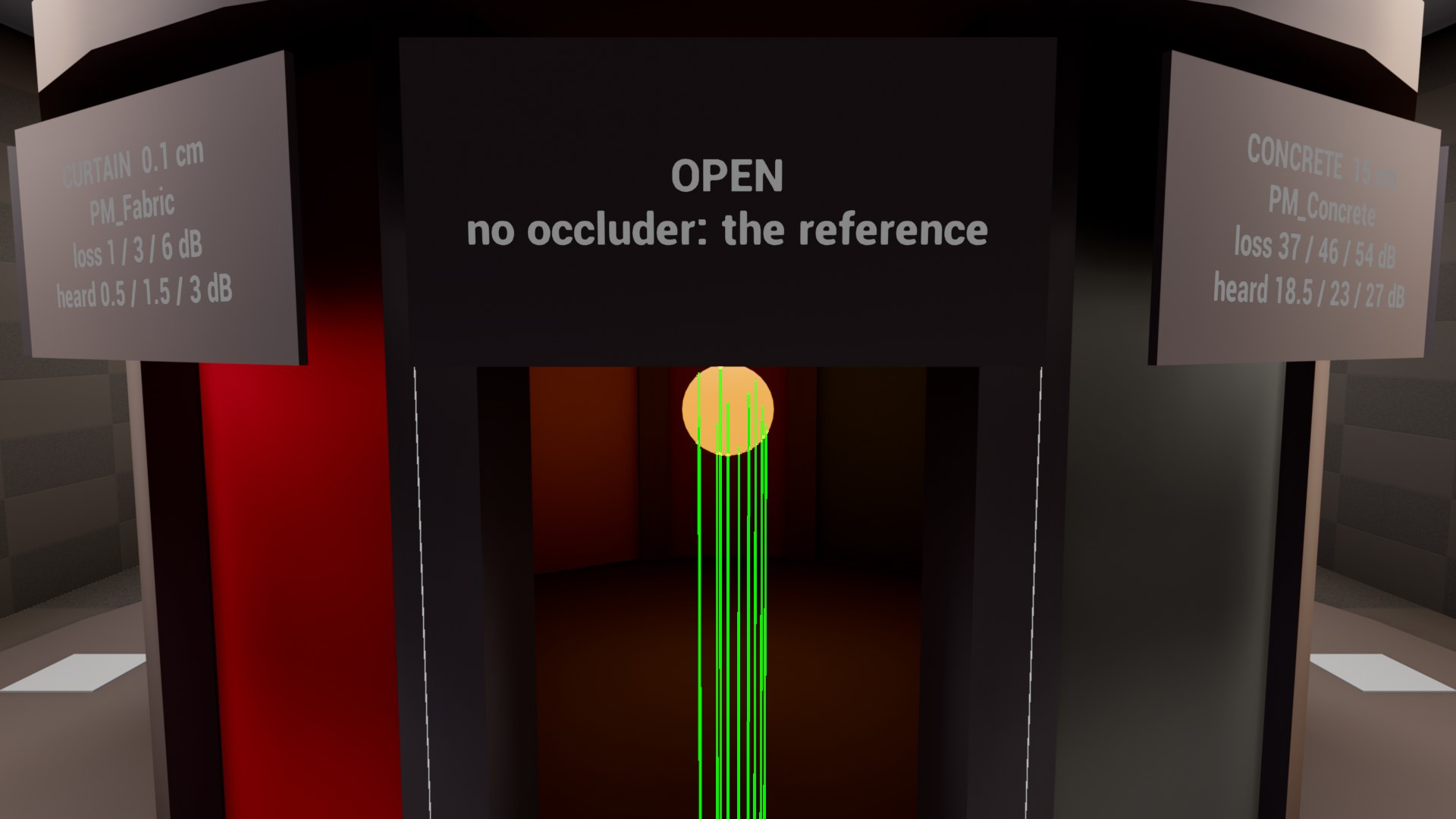
My test map’s audio lab has a twelve-sided booth with a speaker in the middle, one face open and the others each a different construction, from a curtain to 15 cm of concrete. Walk the ring and listen to the mid band climb.
Thirteen rays
A single trace turns every edge into a cliff: step past a doorframe and the sound snaps from open to muffled. I borrowed Steam Audio’s volumetric occlusion. Each sound gets 12 points from a Halton sequence inside a 30 cm sphere around it, plus the source itself, and the plugin casts a ray from your head to each. Points the source can’t see, like ones buried in a wall, are dropped.
Say one ray of 13 slips through a gap and the other 12 cross a stud wall at 46 dB. How much does the wall take off? Guess before you look.
Averaged as energy, which is how incoherent paths add, the answer is 11.1 dB, and the gap wins the way gaps do. Averaged in dB it’s 42.5 dB and the gap vanishes. The loudest ray says 0 dB and turns every crack into an open window. Along one ray, walls multiply, and each ray’s loss is capped at 60 dB to stand in for flanking, the sound that leaks round a wall through the structure.
Each update casts four of the 13 rays, 15 times a second: the source’s own ray every time, the other points in turn. Every point keeps its last result, the way CryEngine amortizes its rays, so the average always covers all 13 and smooths itself. A full refresh takes about 0.27 s, too slow for a slammed door, so when the source’s own ray changes by more than 3 dB, or the source or listener jumps more than 50 cm, the voice recasts everything at once.
Entry, exit, thickness
An object-type multi-trace returns every shape on the ray, where a channel trace stops at the first block. The plugin keeps each hit that blocks the attenuation’s occlusion channel, the engine trace’s own rule, so no level needed re-authoring.
Chaos only reports where a ray enters a shape. Its box and convex raycasts compute the exit and throw it away. So for each entry hit the plugin casts backwards from the far end of the ray against just that hit’s shape, with no broadphase. Exit minus entry is measured along the surface normal, because lab ratings already average over angles of incidence and a grazing ray mustn’t count the wall as thicker.
const double ThicknessCm = Layer.bMeasured
	? (Layer.ExitCm - Layer.EntryCm) * Layer.CosIncidence
	: static_cast<double>(Material.ReferenceThicknessCm);
...
Out.Energy = LayerTransmission(Material, Out.ThicknessCm);
Energy = CombineInSeries(Energy, Out.Energy);
If the backward cast finds nothing, as with a single plane or an open mesh, the layer falls back to the material’s reference thickness. A sound inside a shape, like a radio in a closed drawer, keeps that shape as a layer.
- Ray colour is its mid-band loss, green when clear and red at 40 dB
- Yellow runs from the entry hit to the exit found by the backward cast
- Each ray ends at one of the 13 points round the speaker
- The face's placard, heard 18.5 / 23 / 27 dB
- The voice prints the same three losses on screen
The numbers live on the physical material, in a UAcousticMaterial asset user data entry: lab loss per band at a reference thickness, a slope per doubling of thickness, and a leak fraction for gaps no ray will find, like a door undercut. I took defaults for 14 house materials from published lab measurements where they exist. Concrete gains 4 dB per doubling in the mid band and plywood 2. Hollow assemblies (stud walls, doors, furniture, appliances) get zero, because their collision box is solid and the wall isn’t. Summing a stud wall’s two sheets as separate panels would over-predict its bass loss by about 15 dB.
- Stud wall, half and full thickness
- Plywood, one, two and four sheets
Physics has about 100 dB of range and a game wants about 25, so the plugin halves the physical loss and caps it at 30 dB per band. Nobody vanishes behind one wall.
The drawer rule bit me once. A physics contact point lies on a surface or up to about a centimetre inside it, so impact sounds started inside the floor and played 15 to 20 dB down through it. The fix belongs to whoever places the sound, so my impact effects now lift every sound 5 cm along the contact normal.
Threads
Traces can’t run on the audio render thread, and the render thread can’t wait for them, so each voice passes through four threads.
- Audio thread The source data override writes each voice's emitter, listener and settings into its slot
- Game thread The subsystem picks voices within 32 rays a frame and queues async traces
- Trace workers The engine's async trace queue runs the scene queries
- Game thread, next tick Exit recasts, materials and band math, then three gains per voice are published
- Audio render thread The occlusion plugin reads the gains without a lock and ramps the EQ
Each slot carries a generation number, so when the engine reuses a slot for a new sound, a result traced for the old one is dropped on arrival. The published gains are three relaxed atomics per voice. A read can mix two publishes within one buffer, and the smoothing hides it.
The render thread’s first buffer can’t wait a frame, or a sound that starts behind a wall blips through open. So a new voice starts from the same owner’s last result near the same spot (the next footstep), or else one synchronous test trace. Book drops caught a bug there. SpawnSoundAtLocation makes the world settings the owner of every sound placed without an actor, so a book dropped right after one that landed behind a wall borrowed that result and started quiet. Its attack, about 85 ms, was over before its own trace landed. Placed sounds now trace their own seed.
Doorways
Transmission alone gets direction wrong. If a wall blocks the straight line and an open door stands three metres to the left, you should hear the sound from the door, because sound bends round its edges. Each room is an AAcousticRoom actor, and each doorway or window gets a UAcousticPortalComponent, a box fitted to the opening. For a sound in another room, the subsystem lists every path through up to three doorways, pulls the four shortest tight round each rim at the Keller apex (the edge point that makes the path shortest), and sums the two that carry the most sound. Each leg is cast as a ray too, so a sofa in the way still counts.
Each doorway is priced with Kurze-Anderson, an empirical fit to Maekawa’s barrier curve, summed over the opening’s edges and capped at 25 dB. It gives 5 dB at grazing and nothing once an edge clears the line by about a tenth of a wavelength, 18 cm in the low band and 1.2 cm in the high.
Steam Audio prices the angle a path turns, with a UTD model (after Tsingos et al., SIGGRAPH 2001) that Valve made gentler on purpose in v4.7, three to five times gentler than the physics deep in the shadow. A numerical check against Biot-Tolstoy-Medwin edge diffraction for a 0.9 by 2.1 m door put Kurze-Anderson within about 1.3 dB RMS. With the same halving as the walls, the two land within about a decibel of each other.
| Computed for a 90 degree bend, 2 m and 1 m legs | Low | Mid | High |
|---|---|---|---|
| Kurze-Anderson, halved like the walls | 6.1 dB | 9.0 dB | 12.0 dB |
| Steam Audio’s shipped UTD with its spreading, 1/r falloff | 5.3 dB | 7.8 dB | 12.1 dB |
Physics is the default, and Steam’s utdDeviation is ported line for line (Apache-2.0, credited in the source) as an A/B behind au.AcousticOcclusion.DiffractionModel 1.
The engine applies distance attenuation from the true position before my override runs, so the detour’s extra distance becomes a gain from the sound’s own attenuation curve, less the spreading Kurze-Anderson already counts. The heard position moves toward each path’s first bend by its share of the mid-band energy, and the audio thread glides it into FWaveInstance::Location.
My first pass got two things wrong. It bent twice per doorway, once at each face of the wall, when one bend at the mid-plane is within 1 dB for walls up to 30 cm thick. And it treated a shut door as no path. Round a corner, a shut hollow door plus its diffraction is still louder than the stud wall beside it, and it keeps the sound’s direction at the door. So every door now has two ways through. The air way is a strip on the latch side, 2W·sin(θ/2) wide for a door W wide at hinge angle θ, faded out below 9 cm. The leaf way is the door’s own material, weighted by how shut it is.
Paths and wall rays add as energy, with one catch. A wall ray that already passes through a path’s doorways is the same sound as the path, so the plugin counts it once, as unseen + Σ max(seen, path). With no path, that reduces to the wall-only result exactly. For the source in the table below, the path also turns the heard direction about 21 degrees toward the jamb.
| A source behind a wall, beside a doorway | Low | Mid | High |
|---|---|---|---|
| Through the wall alone | 10.0 dB | 20.0 dB | 30.0 dB |
| Wall plus the path round the jamb | 8.4 dB | 16.7 dB | 21.9 dB |
Doors gave me my favourite bug. The “has this door moved?” check ran before the frame’s path harvest. In the frame the shut-door pricing landed, the voice compared itself with the open-door paths it was about to drop and queued one more update. When the door then moved to 10 degrees, those legs were still in flight and held up the new pricing, so the stale shut result went out. Moving the check after the harvest fixed it. The mid band now reads 16.73 dB open, 16.98 at 10 degrees ajar and 20.00 shut.
- The listener, where every ray and path starts
- The doorway's portal, a box fitted to the opening, cyan while open
- The path bends once, at the end of the wall, and runs on to the speaker
- The 13 wall rays go straight through the wall and the booth's concrete face
- The path carries all of what's heard, 6.5 / 9.4 / 12.4 dB
Rooms
The same room actors carry reverb. Each sound excites its own room’s reverb, and a neighbouring room’s reverb reaches you through the doorways and walls, each piece of wall priced by its traced material and thickness. My first version was a reverb plugin, and I retired it the same evening, because its audio moved through a side channel that neither the submix graph nor Audio Insights could show. The native version sends each voice to its room’s submix at the engine’s pre-distance stage. That took one engine fix, because the engine mixed an HRTF voice’s mono pre-distance buffer as stereo.
Budgets
I haven’t profiled it on a Quest 3 yet, so each number below is a default, arithmetic on the defaults, or my own budget.
| Value | Where it comes from | |
|---|---|---|
| Rays per world per frame, all voices | 32 | Plugin default |
| Rays per voice update, of 13 | 4 | Plugin default |
| Updates per voice | 15 Hz | Plugin default |
| Worst case, 12 occluded voices | About 720 multi-traces a second, 10 a frame at 72 Hz | 12 voices × 4 rays × 15 Hz |
| Frame target for traces | Under 0.5 ms a frame | My budget |
| EQ, about 6 occluded mono voices | About 1% of one core | Estimate from 8 to 10 biquads per channel |
Virtualized sounds cost nothing, since the engine only calls the source data override for real voices.
Debug view
| Console variable | What it shows or changes |
|---|---|
au.AcousticOcclusion.Debug 1 | Rays coloured by mid-band loss, layers, portals, paths, rooms and each voice’s band losses |
au.AcousticOcclusion.Disable 1 | Open gains for every voice, for A/B |
au.AcousticOcclusion.Portals 0 | Other rooms heard only through walls and doors |
au.AcousticOcclusion.DiffractionModel 1 | Steam Audio’s UTD in place of Kurze-Anderson |
au.AcousticOcclusion.RoomWalls 0 | A neighbouring room’s reverb heard only from its doorways |
A line drawn from your own head is a single point to your own eye, so the rays start 30 cm below the head and rise to meet the real ray at each sample point.
Next
The next step is a Quest 3 build with Unreal Insights open, to turn every estimate in the budget table into a measurement. Until then, here’s one walk from the hall to the booth.